D:\\workspace-home\\spring-custom\\src\\main\\resources\\spring\\app-context.xml
* 读取配置文件 * * @author lihzh * @date 2012-5-5 上午10:53:53 */ @Test public void testPlainAbsolutePath() { String path = "D:\\workspace-home\\spring-custom\\src\\main\\resources\\spring\\app-context.xml"; ApplicationContext appContext = new FileSystemXmlApplicationContext(path); assertNotNull(appContext); VeryCommonBean bean = appContext.getBean(VeryCommonBean.class); assertNotNull(bean); assertEquals("verycommonbean-name", bean.getName()); } ``` 测试通过,我们来看下Spring是怎么找到该文件的。之前已经说过refresh这个函数,是Spring生命周期的开始,我们就以它为入口,顺藤摸瓜,时序图如下 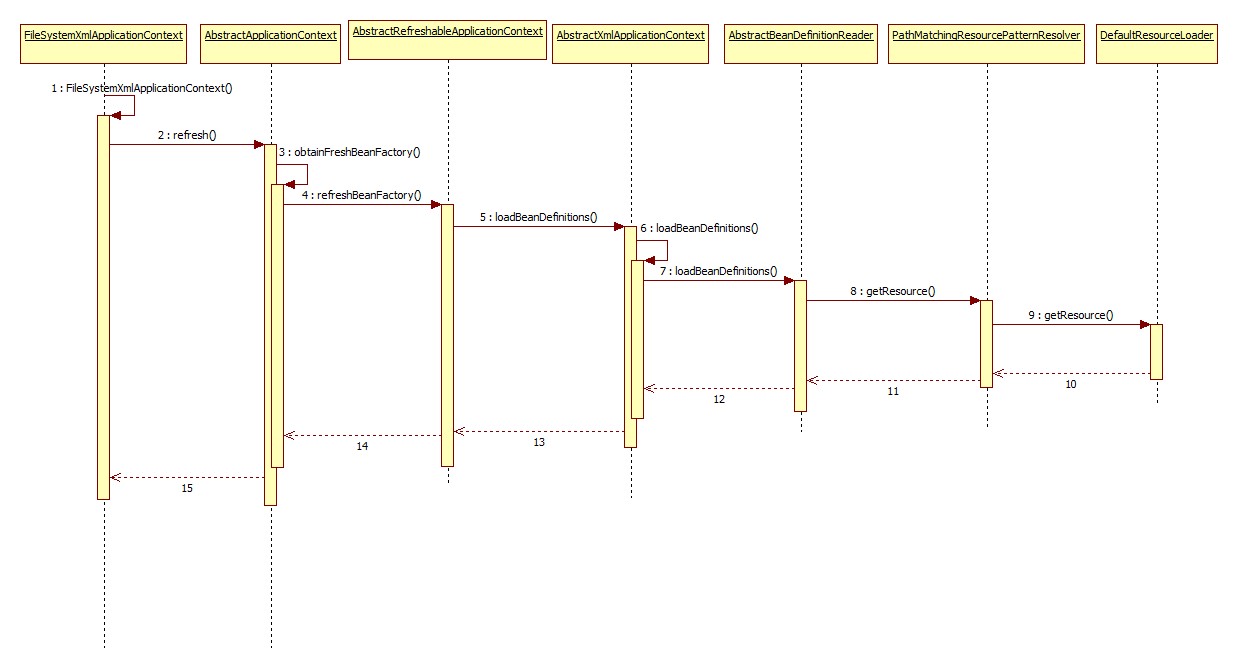 最终,我们找到解析路径的关键方法,**PathMatchingResourcePatternResolver**的*getResources*方法和**DefaultResourceLoader**中的*getResource*方法: ```java public Resource[] getResources(String locationPattern) throws IOException { Assert.notNull(locationPattern, "Location pattern must not be null"); if (locationPattern.startsWith(CLASSPATH_ALL_URL_PREFIX)) { // a class path resource (multiple resources for same name possible) if (getPathMatcher().isPattern(locationPattern.substring(CLASSPATH_ALL_URL_PREFIX.length()))) { // a class path resource pattern return findPathMatchingResources(locationPattern); } else { // all class path resources with the given name return findAllClassPathResources(locationPattern.substring(CLASSPATH_ALL_URL_PREFIX.length())); } } else { // Only look for a pattern after a prefix here // (to not get fooled by a pattern symbol in a strange prefix). int prefixEnd = locationPattern.indexOf(":") + 1; if (getPathMatcher().isPattern(locationPattern.substring(prefixEnd))) { // a file pattern return findPathMatchingResources(locationPattern); } else { // a single resource with the given name return new Resource[] {getResourceLoader().getResource(locationPattern)}; } } } ``` ```java public Resource getResource(String location) { Assert.notNull(location, "Location must not be null"); if (location.startsWith(CLASSPATH_URL_PREFIX)) { return new ClassPathResource(location.substring(CLASSPATH_URL_PREFIX.length()), getClassLoader()); } else { try { // Try to parse the location as a URL... URL url = new URL(location); return new UrlResource(url); } catch (MalformedURLException ex) { // No URL -> resolve as resource path. return getResourceByPath(location); } } } ``` 其中常量 ```java CLASSPATH_ALL_URL_PREFIX = "classpath*:"; CLASSPATH_URL_PREFIX = "classpath:"; ``` 我们输入的路径是绝对路径:"D:\\workspace-home\\spring-custom\\src\\main\\resources\\spring\\app-context.xml"。不是以**classpath\***开头的,所以会落入else之中。在else中:**getPathMatcher().isPattern()**,实际是调用**AntPathMatcher****中的isPattern()**方法: ```java public boolean isPattern(String path) { return (path.indexOf('*') != -1 || path.indexOf('?') != -1); } ``` 是用来判断":"以后的路径中是否包含通配符"\*"或者 "?"。我们的路径显然也不包含,所以最终会直接走入**getResource**方法。 路径仍然既不是以classpath开头的,也不是URL格式的路径,所以最终会落入**getResourceByPath(location)**这个分支,而我们之前介绍过,这个方法恰好是在FileSystemXmlApplicationContext这个类中复写过的 ```java protected Resource getResourceByPath(String path) { if (path != null && path.startsWith("/")) { path = path.substring(1); } return new FileSystemResource(path); } ``` 我们给的路径不是以"/"开头,所以直接构造了一个**FileSystemResource** ```java public FileSystemResource(String path) { Assert.notNull(path, "Path must not be null"); this.file = new File(path); this.path = StringUtils.cleanPath(path); } ``` 即用路径直接构造了一个File。这里**StringUtil.cleanPath**方法主要是将传入的路径规范化,比如将windows的路径分隔"\\"替换为标准的"/",如果路径中含有"."(当前文件夹),或者".."(上层文件夹),则计算出其真实路径。而File本身是支持这样的路径的,也就是说,spring可以支持这样的路径。出于好奇,我们也针对这个方法测试如下: ```java /** * 测试通过含有.或者..的绝对路径 *D:\\workspace-home\\spring-custom\\.\\src\\main\\resources\\spring\\..\\spring\\app-context.xml
* 读取配置文件 * * @author lihzh * @date 2012-5-5 上午10:53:53 */ @Test public void testContainDotAbsolutePath() { String path = "D:\\workspace-home\\spring-custom\\.\\src\\main\\resources\\spring\\..\\spring\\app-context.xml"; ApplicationContext appContext = new FileSystemXmlApplicationContext(path); assertNotNull(appContext); VeryCommonBean bean = appContext.getBean(VeryCommonBean.class); assertNotNull(bean); assertEquals("verycommonbean-name", bean.getName()); } ``` 容器可以正常初始化。路径计算正确。 > 补充说明:Spring最终读取配置文件,是通过**InputStream**加载的,Spring中的各种Resource的最上层接口**InputStreamResource**中定义了唯一的一个方法**getInputStream**。也就是说,只要保证各Resource的实现类的**getInputStream**方法能够正常获取流,Spring容器即可解析初始化。 对于**FileSystemResource**而言,其实现如下: ```java /** * This implementation opens a FileInputStream for the underlying file. * @see java.io.FileInputStream */ public InputStream getInputStream() throws IOException { return new FileInputStream(this.file); } ``` 所以,我们说,此时只有是File正常支持的格式,Spring才能正常初始化。 继续回到前面的话题。我们目前只验证else分支中的**catch**分支。根据代码分析,即使是**FileSystemXmlApplicationContext**也可以支持Classpath格式的路径和URL格式的路径的。验证如下 ```java /** * 测试通过含有.或者..的绝对路径 *file:/D:\\workspace-home\\spring-custom\\src\\main\\resources\\spring\\app-context.xml
* 读取配置文件 * * @author lihzh * @date 2012-5-5 上午10:53:53 */ @Test public void testURLAbsolutePath() { String path = "file:/D:\\workspace-home\\spring-custom\\src\\main\\resources\\spring\\app-context.xml"; ApplicationContext appContext = new FileSystemXmlApplicationContext(path); assertNotNull(appContext); VeryCommonBean bean = appContext.getBean(VeryCommonBean.class); assertNotNull(bean); assertEquals("verycommonbean-name", bean.getName()); } /** * 测试通过Classpath类型的路径 *classpath:spring/app-context.xml
* 通过读取配置文件 * * @author lihzh * @date 2012-5-5 上午10:53:53 */ @Test public void testClassPathStylePath() { String path = "classpath:spring/app-context.xml"; ApplicationContext appContext = new FileSystemXmlApplicationContext(path); assertNotNull(appContext); VeryCommonBean bean = appContext.getBean(VeryCommonBean.class); assertNotNull(bean); assertEquals("verycommonbean-name", bean.getName()); } ``` 验证通过,并且通过debug确认,确实走入了相应的分支,分别构造了**UrlResource**和**ClassPathResource**实例。所以,之后Spring会分别调用这个两个Resource中的**getInputStream**方法获取流,解析配置文件。附上这两个类中的**getInputStream**方法,有兴趣的可以继续研究。 ```java /** * This implementation opens an InputStream for the given URL. * It sets the "UseCaches" flag tofalse,
* mainly to avoid jar file locking on Windows.
* @see java.net.URL#openConnection()
* @see java.net.URLConnection#setUseCaches(boolean)
* @see java.net.URLConnection#getInputStream()
*/
public InputStream getInputStream() throws IOException {
URLConnection con = this.url.openConnection();
ResourceUtils.useCachesIfNecessary(con);
try {
return con.getInputStream();
}
catch (IOException ex) {
// Close the HTTP connection (if applicable).
if (con instanceof HttpURLConnection) {
((HttpURLConnection) con).disconnect();
}
throw ex;
}
}
/**
* This implementation opens an InputStream for the given class path resource.
* @see java.lang.ClassLoader#getResourceAsStream(String)
* @see java.lang.Class#getResourceAsStream(String)
*/
public InputStream getInputStream() throws IOException {
InputStream is;
if (this.clazz != null) {
is = this.clazz.getResourceAsStream(this.path);
}
else {
is = this.classLoader.getResourceAsStream(this.path);
}
if (is == null) {
throw new FileNotFoundException(
getDescription() + " cannot be opened because it does not exist");
}
return is;
}
```
上述两个实现所属的类,我想应该一目了然吧~~
至此,我们算是分析验证通过了一个小分支下的支持的路径的情况,其实,这只是这些都是最简单直接的。回想刚才的分析,***如果路径包含通配符(?,\*)spring是怎么处理的?***如果是以***classpath\****开头的又是如何呢?我们下回分解……
---
Source: OneCoder (https://www.coderli.com/spring-filesystem-filepath-parse/) | GESP Wiki: https://wiki.coderli.com/ | OI-Game: https://oi.coderli.com/